Edge Loop Reduction in 3ds Max: Topology Cheat Sheet
When I was learning hard-surface modeling, I often forgot how to redirect, add, or reduce edge loops in a clean way.
I would stop modeling, search for a topology reference, and try to remember which pattern would give me the result I needed. It was a small problem, but it happened often enough to interrupt my workflow.
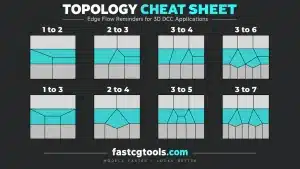
So I made a simple topology cheat sheet for myself.
It shows several useful edge flow patterns for moving between different numbers of edge loops, including edge loop reduction, adding supporting loops, and transitioning between areas with different mesh densities.
I originally made it as a quick reference for my own hard-surface modeling workflow. Since it may also be useful to other 3ds Max artists, I decided to share it through the FastCGTools Blog.

Why Edge Loop Reduction Matters in Hard-Surface Modeling
Hard-surface models often need different levels of detail across the same object.
One area may require several closely spaced edge loops to control a bevel or support a sharp corner. Another area may not need the same amount of geometry. If these areas are connected without planning the edge flow, the model can become unnecessarily dense or develop unwanted shading problems.
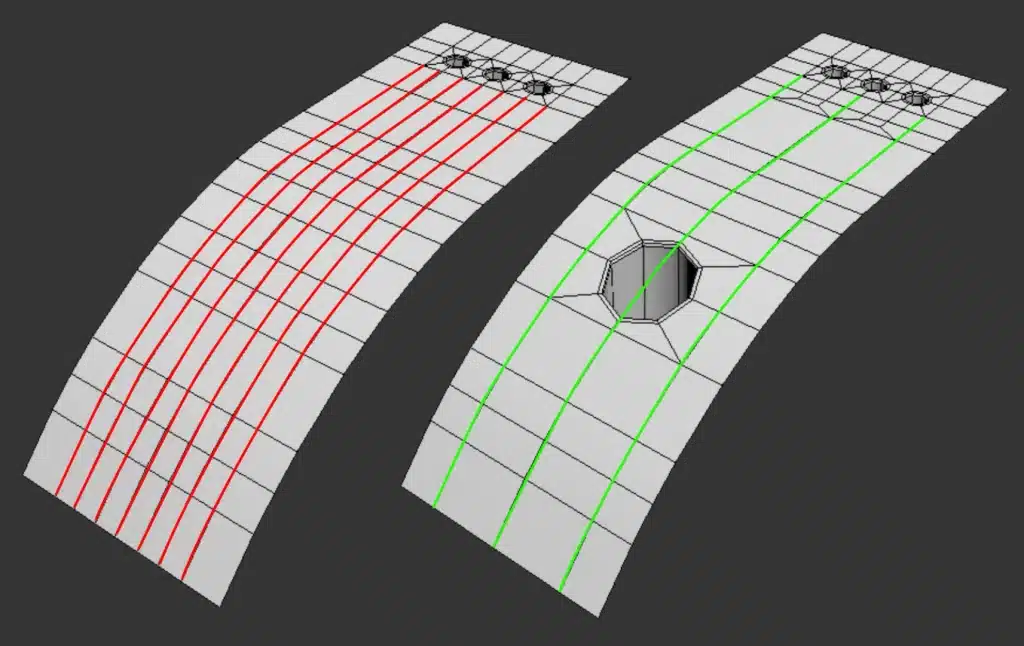
This is where edge loop reduction becomes useful.
Edge loop reduction is the process of transitioning from a denser area of geometry to a simpler one while keeping the topology controlled. Instead of carrying the same number of loops across the entire model, you can gradually redirect or reduce the edge flow where the extra detail is no longer needed.
This can help you:
- Keep the mesh lighter in less important areas
- Preserve control around hard-surface details
- Avoid unnecessary geometry
- Create cleaner transitions between different mesh densities
- Prepare the model for subdivision or further editing
The goal is not simply to remove edges. The goal is to reduce or redirect edge loops without losing control of the surface.
Watch the Short Video
In the Short video below, I go through the topology patterns one by one and show how they can be used for adding, redirecting, and reducig edge loops.
How I Use This Reference
The cheat sheet includes several common topology transitions:
I keep references like this nearby when working on hard-surface models. I do not always follow a pattern exactly, but the sheet gives me a quick visual reminder of the possible transitions.
This is especially useful when:
- A bevel creates more loops than the surrounding mesh needs
- A detailed area needs to connect to a simpler surface
- You are preparing geometry for subdivision
- You want to reduce unnecessary mesh density
- The edge flow is becoming difficult to plan from memory
For me, the main benefit is not memorizing every topology pattern. It is reducing the time spent stopping the modeling process to search for a solution.
Final Thoughts
Topology becomes easier to manage when you stop treating every edge flow problem as something you have to solve from the beginning.
I am still collecting and building these kinds of references for my own modeling workflow. Some are reminders for techniques I use regularly, while others help me understand solutions I am still practicing.
This cheat sheet is one of those practical references. I hope it saves you some searching time the next time you need to add or reduce edge loops in a hard-surface model.
If you would like to see more topology breakdowns, modeling references, or 3ds Max workflow tips, leave a comment and tell me what I should cover next.
Did you see my latest 3d models?